Nel 2026 Gemini e ChatGPT sono vicini in termini di intelligenza grezza - la vera differenza sta nell'aderenza alle tue esigenze. Gemini è migliore per le attività multimodali, l'integrazione con Google Workspace e il lavoro con contesti lunghi; ChatGPT è migliore per la qualità della scrittura, il ragionamento complesso e il suo ecosistema maturo di plugin.
Se stai decidendo tra i due, lascia perdere le guerre dei benchmark. Ecco un confronto pratico - oltre a un modo per rendere sensibilmente migliore quello che scegli nel tuo lavoro reale.
In breve
Entrambi sono assistenti di prima categoria e ottengono punteggi distanti meno di un punto negli indici di intelligenza generale. La scelta dipende quindi dal tuo ambiente e dal tipo di lavoro che svolgi. Vivi nelle app Google e gestisci molte immagini, video o PDF? Gemini. Ti interessano soprattutto una scrittura curata, il ragionamento passo dopo passo e un ampio ecosistema di strumenti? ChatGPT.
Confronto diretto
| Gemini | ChatGPT | |
|---|---|---|
| Ideale per | Multimodalità (immagini, video, audio, PDF), risposte basate sul web | Qualità della scrittura, ragionamento complesso, creatività |
| Ecosistema | Profonda integrazione con Google Workspace (Gmail, Docs, Drive) | Ampio ecosistema di plugin e strumenti di terze parti |
| Contesto lungo | Finestra di contesto molto ampia | Solido, con un ampio ecosistema di strumenti circostante |
| Scrittura | Capace, accurato | Spesso più curato e strutturato |
| Prezzo per il pubblico | circa 20 $/mese, piano premium | circa 20 $/mese, piano Plus |
Le versioni e i punteggi cambiano rapidamente, quindi considera questi dettagli come una fotografia del momento. I punti di forza indicati sopra sono stati il modello consolidato fino al 2026.
Scegli Gemini se…
- Lavori tutto il giorno in Gmail, Docs, Drive o Sheets e vuoi un'integrazione nativa.
- Le tue attività sono multimodali - analizzare immagini, video, audio o lunghi PDF in un unico prompt.
- Hai bisogno di risposte basate sul web e di un contesto molto ampio per la ricerca.

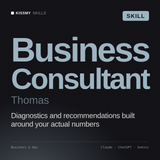
Se ti affidi al lungo contesto di Gemini per assimilare report e strutturare problemi complessi, Thomas aggiunge framework formati da McKinsey, così l'output è una raccomandazione strutturata, non solo un riepilogo.
Visualizza Thomas - Consulente aziendale →Scegli ChatGPT se…
- La qualità e il tono della scrittura contano più di tutto - testi di marketing, saggi, lavori creativi.
- Vuoi un ragionamento approfondito, passo dopo passo, sui problemi complessi.
- Fai affidamento su un ampio ecosistema di plugin e integrazioni.

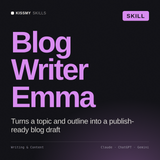
ChatGPT scrive già bene senza configurazioni - Emma lo porta oltre, trasformandolo in contenuti di livello editoriale e coerenti con il brand, che sembrano scritti da uno specialista, non da un generalista.
Visualizza Emma - Blog Writer →L'upgrade che supera entrambe le scelte
Qualunque assistente tu scelga, all'inizio è un generalista. Il modo più rapido per farlo lavorare come uno specialista è fornirgli una Skill - un file di istruzioni riutilizzabile che codifica esattamente come deve essere svolta un'attività, così l'output non dipende più da quanto bene hai formulato il prompt di oggi.
I file Skill sono portabili: incolla lo stesso in ChatGPT, Gemini o Claude e otterrai un comportamento da specialista coerente su tutti e tre. Scopri la libreria KissMySkills con oltre 1.000 Skills, pacchetti di prompt e agenti, oppure prova il flusso di lavoro con un generatore gratuito o una Skill gratuita - senza registrazione.
Domande frequenti
Gemini è migliore di ChatGPT?
Non in assoluto: sono vicini in termini di intelligenza generale. Gemini è in vantaggio per le funzionalità multimodali e l'integrazione con Google Workspace; ChatGPT prevale per qualità della scrittura, capacità di ragionamento e per il suo ecosistema di plugin. La scelta migliore dipende dal tuo ambiente e dalle tue attività.
Qual è il migliore per scrivere?
ChatGPT è spesso considerato più efficace per una scrittura curata, strutturata e creativa, mentre Gemini è molto capace e accurato. Per una scrittura coerente con il tuo brand in entrambi, aggiungi una Skill di scrittura.
Posso usare le stesse Skills in Gemini e ChatGPT?
Sì. Un file Skill contiene istruzioni portabili: incollalo nelle istruzioni personalizzate di uno dei due assistenti per ottenere lo stesso comportamento da specialista. La funzione nativa Skills con attivazione automatica è specifica di Claude.
In sintesi:
Se hai scelto Gemini per la ricerca e il lavoro con contesti lunghi, Thomas (Business Consultant) trasforma quel contesto grezzo in raccomandazioni strutturate; se hai scelto ChatGPT per la scrittura, Emma (Blog Writer) porta l'output a una qualità editoriale. Funzionano tutti in Claude, ChatGPT e in qualsiasi chat AI, senza bisogno di programmare e con una garanzia soddisfatti o rimborsati di 30 giorni.
In sintesi
I due sono abbastanza vicini: a decidere il vincitore sono il tuo flusso di lavoro e il tuo ecosistema. Scegli quello più adatto alla tua giornata - poi trasformalo in uno specialista. Scopri le Skills portabili che funzionano con tutti e tre i principali assistenti, oppure confrontali con Claude vs ChatGPT.